AVI files allow you to encode your content to WMV format simply, using Windows Media Encoder, you can see a solution for Converting to WMV here; https://login.netromedia.com/Solutions/View.aspx?ID=bc5923ea-9d8c-4663-8855-7a361a988bfe
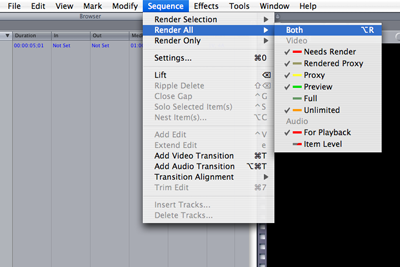
1) Once you have your edit finished editing in Final Cut Pro the first thing that you want to do is Render your audio and video. To do this we want to select “Sequence” across the top then go down to “Render All” then move over and select “Both”, this will render both your video and audio.
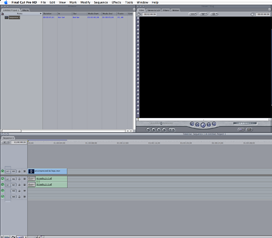
2) Now that the rendering is completed we export the timeline, to do this select the timeline with a single mouse click on the timeline. This step avoids exporting single clips from the viewer window.
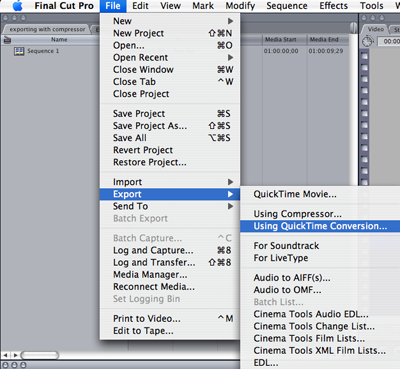
3) Next we can click on “File” located in the menu across the top, we will then move down and select “Export”, then move over and choose “Quick Time Conversion”
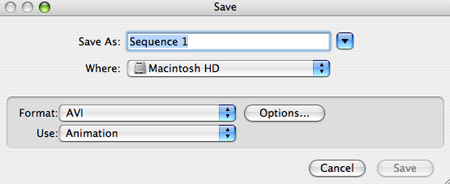
4) Now the Save options will appear, beside "Format" we want to click the drop down arrow and choose "AVI"
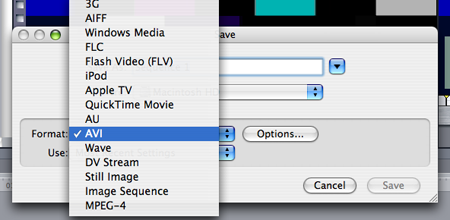
5) It is important to remember to click the drop down arrow labeled "USE" then to click "Animation" Failure to do so will make your final video look bad.
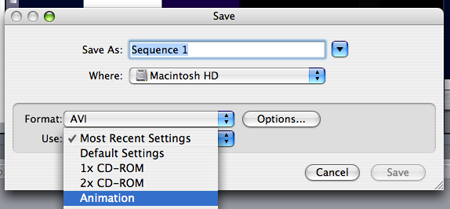
6) Now check to see that your options are the same as below and choose a file name and save your movie.